Solo III screens keep falling out? What actually fixes it
A short thread in the Arizer owners’ community on Reddit in mid-October asked a question we hear a lot: why do the metal screens in a Solo III stem keep falling out, even when you only use genuine Arizer parts? The original poster said no amount of adjusting would keep them in place. The replies were short but useful, and they match Arizer’s own advice. Here’s why it happens, the fixes owners actually use, and why you may not need a metal screen at all.
First, does your Solo III need a metal screen?
Many owners assume the screen is essential. It isn’t. Arizer’s own product page for its Air / Solo screen pack says that its glass aroma tubes already have a built-in glass screen to keep vapour pure, and that the metal screens are offered “for your convenience”. Arizer goes further and says metal screens can make vapour harsher and dull the flavour, and it recommends whole or coarsely ground herbs with no metal screen for the smoothest, tastiest results.
So if you grind coarsely and the built-in glass screen is doing its job, you can simply leave the metal screen out. Several replies in the thread said exactly that: they don’t bother with screens at all.
A metal screen still earns its place in some situations, though:
- You grind fine. Fine particles can slip through the glass holes and end up in the stem or your mouth.
- You want an easy-to-clean barrier. A screen catches debris before it bakes onto the glass, so the stem stays cleaner for longer.
- You want to tune airflow. Different mesh sizes change how open or restricted the draw feels.
Why screens keep falling out
A loose screen sits in the bowl end of the stem and is held only by friction against the glass. Lose that grip and it drops out, usually as you empty the stem. The usual culprits are:
- Flat screens that spring back. A flat disc pushed into a round glass bowl tends to straighten itself out and lose contact with the wall.
- Glass tolerances. Glass stems are not machined parts, so the inside of the bowl can vary slightly from one stem to the next. A screen that grips firmly in one stem may sit loose in another.
- Tapping and stirring. Knocking out a spent bowl or stirring with the tool can nudge the screen loose, especially once it has been through a few heat cycles.
- Bent or tired screens. Screens that have been removed and cleaned many times lose their shape and their grip.
Fixes owners recommend
The replies in the thread boiled down to three practical approaches.
1. Use a pre-domed basket screen
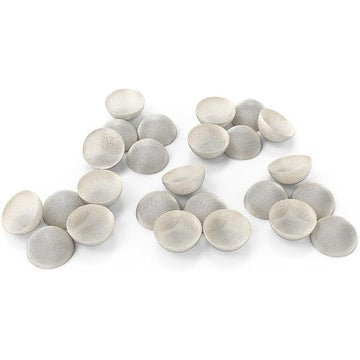
The most common suggestion was a tighter-fitting, domed screen. A dome shape works because it presses outwards against the glass all the way round instead of lying flat. Our own Precision-Fit domed basket screens for the Arizer Solo 3 and Air Max were designed for exactly this. They are 12 mm across and 7 mm deep, push in with a fingertip, and come out again with a pick. You don’t need to cut or shape anything. They come in standard, fine and coarse stainless steel mesh, plus a brass option, so you can choose between more filtration and a more open draw.

2. Shape a larger screen into a basket
One owner suggested a DIY version: take a slightly larger screen, fold its edge over the end of a pencil to form a small cup, then push it into the stem. The folded rim acts like a spring and grips the glass. Results vary with the screen you start with, so check for sharp edges and never force it into the glass.
3. Skip the metal screen
This is Arizer’s own recommendation: with a coarse grind and the built-in glass screen, there is nothing to fall out.
Another option: take the mess out of the stem altogether
If the real goal is a cleaner stem and easier reloads, a dosing capsule can do the screen’s job and more. There are two styles for the Solo series:
- In-chamber capsules. Our In-Chamber XL dosing capsules sit directly in the Solo’s heating chamber, and the glass stem rests on top. The herb never touches the glass, and the capsule has airflow holes on the top and sides.
- In-stem capsules. The XL Fit micro dosing capsules are smaller (12 mm tall, 9 mm wide) and sit inside compatible XL glass stems. They suit smaller, measured loads and pre-packing for later. They aren’t meant for standard-depth stems.

Some people prefer the flavour of loading straight into glass, so treat capsules as an option, not a must-have.
Quick checklist
- If you use one, go domed. A pre-shaped basket grips the glass far better than a flat disc.
- Replace tired screens. Once a screen is bent out of shape, a fresh one costs less than the frustration.
- Empty gently. Tip the bowl out over a tray instead of knocking the stem hard.
- Try a different stem. If one stem never holds a screen, its bowl may simply be slightly wider.
- Keep everything clean. Soak screens and stems in isopropyl alcohol, rinse with warm water and let them dry fully. Our guide to cleaning glass cooling stems safely covers the details.
Spare stems help too
A few stems on rotation let you pre-fit screens and soak dirty ones later. The Classic Pro master accessory stem kit bundles five long stems with 25 screens. If you’re weighing up the larger XL glass, our Solo 3 XL stems buyer’s guide explains the differences. You’ll find every stem, screen and upgrade in our Arizer Solo 3 stems and accessories collection.

The bottom line
A Solo III screen that won’t stay in isn’t a fault with your device. Use a domed screen, a carefully shaped DIY basket or, as Arizer suggests, no metal screen at all with a coarser grind. If you want cleaner stems more than finer filtration, a dosing capsule is worth a try.